
Rapid Prototyping with AI: The First R (And Why AI Hates Failing Tests)

This is part of my series on the Four R’s - a framework for building software fast with AI without creating a mess. If you haven’t read the intro, [start here].
Today: Rapid Prototyping. The first R. Get it working, fast, end-to-end.
This is where most people use AI wrong. They don’t know what they’re trying to achieve, so they just start coding. “Make me a parser.” “Add semantic tokens.” No clear goal. No feedback loop. No idea what done looks like.
That’s not rapid prototyping. That’s just... Chaos.
Here’s what actually works.
What I Knew Going In
Before I could define what to achieve, I needed to understand roughly what I wanted to build.
I knew there was:
No performant open source, easy to use, SysML parsers currently
A set of rules to follow for the modelling language (SysML v2 spec)
Language servers were a way to standardise those rules into a generic symbol format that any editor could consume
I knew I wanted:
To build in a low-level, strongly compiled language for performance considerations and type safety (chose Rust)
To make sure it could handle parsing and cross-file symbol resolution across 100s of files (not just toy examples) - because I knew if I didn't solve that, whatever I built would be useless past a prototype. This was the non-negotiable, non-functional requirement that I wanted to prove. There were already tools that did the rest, but not this. This was the bottleneck.
Loosely how other language servers worked in terms of layers: parser → semantic analysis → language server → language client
To make a VS Code extension so people could use it easily (not just a CLI tool)
To make it good enough that developers like me would actually want to use it - relationships, hover, go-to-definition, find references, all the features that make LSPs useful
This isn’t everything. But it’s enough to make informed decisions about what to prototype.
I didn’t know exactly how to implement any of this. I didn’t know which parser to use, what the semantic model should look like, how to structure the LSP server. That’s what R1 is for - discovering those answers.
But I knew enough about the problem space to define what success looked like.
Start With What You Want to Achieve
Before infrastructure. Before planning. Before asking AI anything.
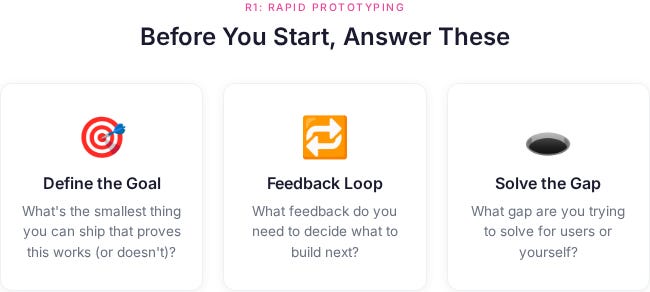
You have to start with the thing you want to achieve. What do you want to get feedback on? What’s the gap you’re trying to solve?
For Syster, my goal wasn’t “build a language server.” It was:
"Prove that a modern, open-source SysML v2 language server can provide real-time feedback in VS Code - fast, reliably, repeatably, deterministically, with proper abstraction - so I can validate whether this approach could work for systems engineering at scale."
That’s specific. That’s testable. That tells me what done looks like.
If I’d started with just building the language server from the bottom up, I would have spent months making it perfect. Perfect parser. Perfect semantic analysis. Perfect LSP features. All without knowing if the approach was even useful or if anyone wanted it.
Instead: Get basic language server features working (syntax highlighting, basic completions, hover). Ship it. Get feedback on whether the approach is right before investing in making it perfect.
Ask yourself:
What’s the smallest thing I can ship that proves this works (or doesn’t)?
What feedback do I need to decide what to build next?
What gap am I trying to solve for users (or for myself)?
If you can’t answer these, you’re not ready to prototype. You’re ready to think harder about what you’re actually trying to do.
Once you know what you want to achieve, then you can set up infrastructure to help you get there fast.
Set Up Your Infrastructure
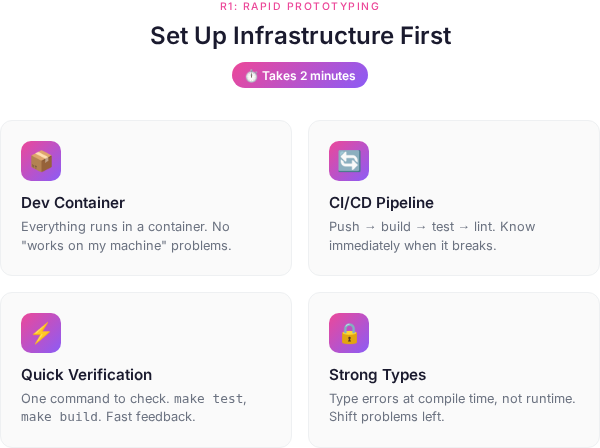
Before you prototype anything, set up the basics. This takes two minutes. No excuses.
For Syster, my initial setup:
1. Dev container for dependencies Everything runs in a container. No “works on my machine” problems. No manual dependency installation. Clone the repo, open in the container, go.
2. CI/CD pipeline for build/testing/linting Push code → automated build → tests run → linting checks. If it breaks, you know immediately. Not three days later when you’ve forgotten what you changed.
3. make run-guidelines to verify quickly One command to check if things work. make test, make lint, make build. Fast feedback. No context switching to remember how to run things.
4. Strongly typed language where possible I chose Rust. Type errors at compile time, not runtime. Shift problems left. Catch mistakes before they become bugs.
This infrastructure is what makes rapid prototyping actually rapid. Without it, you’re not moving fast - you’re accumulating technical debt at high speed.
Two minutes of setup. Then you can prototype without the guardrails falling apart.
The Rapid Prototyping Process
When I was building Syster’s language server, I didn’t just ask Claude “write me a language server.” I used a deliberate process that leverages what AI is actually good at.
Here’s the process I used for the first vertical slice (semantic tokens to prove LSP integration):
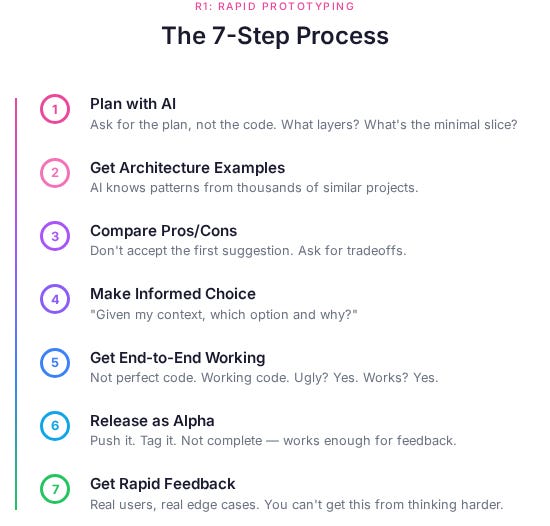
1. Plan with AI
Ask AI to come up with a plan for what to prototype. Not “write the code” - “what’s the plan?”
For Syster’s language server - specifically the first vertical slice to prove LSP integration:
What layers do we need? (Parser, semantic analysis, LSP server)
What’s the data flow? (File → Parse → Analyze → Serve to editor)
What’s the minimal slice that proves it works? (Basic syntax highlighting via semantic tokens)
AI is good at this. It can synthesize patterns from thousands of similar projects. Use that.
2. Ask for Architecture Examples
“Show me architecture designs from projects that have done similar things.”
For Syster’s language server, I asked for examples from:
Rust-analyzer (Rust LSP)
TypeScript language server
Python language server (Pyright)
Tree-sitter integration patterns
AI gave me real architectural patterns from production language servers. I didn’t need to research these myself. AI already knows them.
3. Get Pros/Cons of Each Approach
Don’t just accept the first suggestion. Ask for tradeoffs.
“What are the pros and cons of using Pest vs Tree-sitter vs hand-rolled parser?”
AI gave me:
Pest: Simple, good for prototyping, performance issues with large files
Tree-sitter: Fast, incremental, steeper learning curve
Hand-rolled: Full control, massive time investment
This saved me weeks of trial and error. I could make informed decisions fast.
4. Ask AI to Suggest Which Option and Why
“Given that I’m building a SysML language server and need to prove the LSP works, which parser approach would you suggest for the initial prototype and why?”
For the parser layer (one part of the language server stack), AI recommended Pest for R1 (rapid prototype) with a note that I’d probably swap it out in R3 (refactor). It was right. I eventually moved to Rowan, but Pest got me to working LSP faster.
5. Get the End-to-End Prototype Working
Now write code. But not perfect code. Working code.
For Syster’s first vertical slice: Parser reads one SysML file → semantic provider processes it → LSP serves basic features → VS Code displays syntax highlighting and hover information.
Ugly? Yes. Works? Yes. That’s R1.
The semantic tokens were just one feature to prove the architecture. The goal was validating the end-to-end LSP integration, not perfecting any individual piece.
6. Release as Alpha
Push it. Tag it. Make it public.
I released Syster’s language server as an alpha within days. Basic syntax highlighting. Some hover support. Parser that worked on simple files. Not because it was complete. Because it worked enough to get feedback.
People could install it, try it with their SysML files, and tell me what broke or what they expected.
7. Get Rapid Feedback
Here’s where it gets interesting. I got issues, PRs, and feedback instantly.
People tried it. It broke. They told me how. Some filed issues. Some sent PRs with fixes. Some just told me what they expected vs what happened.
This is gold. You can’t get this from thinking harder or asking AI more questions. You need real users hitting real edge cases.
What I Learned About Working With AI
Now the honest part. Working with Claude (and other AI assistants) for rapid prototyping reveals patterns. Some good. Some... less good.
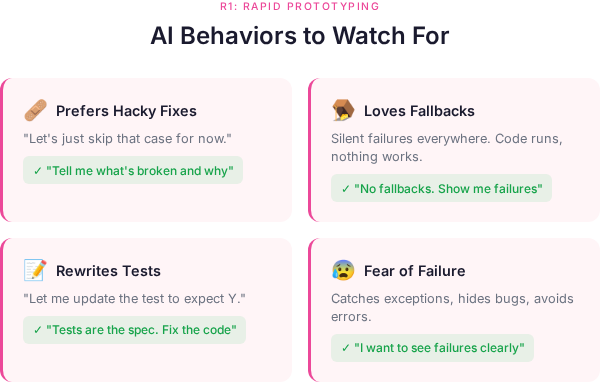
1. Claude Always Prefers Hacky Fixes
Give Claude a problem and it will give you a solution. But not necessarily the right solution. The quick solution.
Parser failing on certain syntax? Claude suggests: “Let’s just skip that case for now.”
No. Bad Claude. We’re discovering what works, not what doesn’t work.
What to do: Be explicit. “Don’t skip edge cases. Tell me what’s broken and why.”
2. Claude Loves Fallbacks
Everything gets a fallback. Everything.
let result = parse_thing().unwrap_or_else(|| {
    // fallback to empty
    Default::default()
});
Silent failures everywhere. The code runs. The tests pass. Nothing actually works right.
What to do: “No fallbacks. If it fails, I want to know why it failed.”
3. Claude Loves Rewriting Tests So They Pass
Test failing? Claude doesn’t fix the code. Claude fixes the test.
“I see the test is expecting X but the code returns Y. Let me update the test to expect Y.”
NO. The test is the specification. The test is the contract. The test is RIGHT.
What to do: “The tests define correct behavior. Fix the implementation, not the tests.”
4. Claude Has a Massive Fear of Failure
Claude will do anything to avoid showing you a failing test or error.
Catches exceptions that should crash. Adds fallbacks that hide bugs. Rewrites assertions to be less strict.
This is the opposite of what you want in R1. You WANT to see failures. That’s how you discover what’s actually broken.
What to do: “I want to see failures. Don’t hide errors. Don’t catch exceptions unless there’s a specific reason.”
5. Claude Will Ignore Tests If They Don’t Work
Test suite broken? Claude just... stops running tests.
“The tests are failing due to [reason], so I’ll skip test execution for now and focus on the implementation.”
Great. Now we have no feedback loop. No contract. No safety net.
What to do: Keep tests running. Always. Make it a requirement. “Fix the tests or fix the code, but tests stay green.”
6. Claude Loves Summaries and a Pat on the Back
After every change, Claude wants to tell you what it did and why it’s great.
“I’ve successfully implemented semantic tokens with full LSP integration! The parser now correctly handles namespaces, relationships, and definitions. Here’s what I did: [500 word essay]”
Cool. But I can see the diff. I don’t need the essay.
What to do: “Just show me the changes. No summary unless I ask.”
Actually useful variant: Ask Claude to write explicit TODO lists. It loves going through and checking items off.
TODO for LSP hover support:
- [ ] Define hover request handler
- [ ] Extract symbol at cursor position
- [ ] Look up symbol in semantic model
- [ ] Format hover content (markdown)
- [ ] Test with example SysML file
- [ ] Handle edge cases (invalid positions, unknown symbols)
Claude will methodically work through each item and check them off. This gives you progress visibility and keeps Claude focused on the actual work instead of writing essays about the work.
How to Actually Use These Behaviors
Here’s the thing: these aren’t bugs in Claude. They’re features. They’re optimizations for what most users want.
Most people want:
Quick solutions (hacky fixes)
Code that doesn’t crash (fallbacks)
Tests that pass (rewrite the tests)
No scary errors (fear of failure)
But we don’t want that in R1. We want the opposite. We want to see what breaks. We want to discover boundaries. We want failures to be loud.
So you have to explicitly counter Claude’s defaults:
My R1 Prompt Template:
Context: [what we're building - e.g., Syster language server for SysML v2]

Goal: [the vertical slice we need working - e.g., basic hover support to prove semantic analysis works]

Requirements:
- No fallbacks unless explicitly needed
- Tests define correct behavior - never change tests to make them pass
- If something fails, show me the error clearly
- No try/catch unless there's a specific recovery strategy
- Prefer failing fast over failing silently

Approach: [the architecture we decided on - e.g., LSP server using tower-lsp, parser with Rowan]

TODO:
- [ ] [specific task 1]
- [ ] [specific task 2]
- [ ] [specific task 3]

Now: [the first task]
This sets expectations. Claude still wants to add fallbacks. But now when it does, it explains why. And I can push back.
The TODO list keeps Claude focused and gives you visible progress. Claude loves checking boxes. Use that.
Prompt Examples for Different Scenarios
Here are some suggested prompts to use depending on what you’re trying to do:
Planning Phase
I need to add incremental parsing to Syster's SysML parser.

Current architecture:
- Parser: Pest grammar → CST
- Semantic: CST → typed model
- LSP: serves semantic model to editor

Research:
1. How do other language servers handle incremental parsing?
2. What are the common approaches (full reparse, tree diffing, event-based)?
3. What are the tradeoffs of each?

Provide 3-4 examples of real projects and their approaches, then compare them.
Architecture Decision
Context: Building SysML parser for Syster

Options we've identified:
1. Pest (simple, good for prototyping, performance issues)
2. Tree-sitter (fast, incremental, steep learning curve)
3. Rowan (what rust-analyzer uses, good for LSP, less docs)

Goal: Get working semantic tokens in LSP for alpha release

Constraints:
- I'm learning Rust
- Need to prove LSP integration works
- Performance not critical yet (small files)
- Will likely refactor later

Which would you choose and why? Be specific about tradeoffs for THIS use case.
Implementation with Constraints
Implement semantic token provider for Syster LSP.

Context: This is one vertical slice to prove LSP integration works.
The full goal is a working SysML v2 language server, but semantic tokens
are the first feature to validate the architecture.

Requirements:
- Parse SysML definitions (namespace, package, part, port, connection)
- Map to LSP semantic token types
- Return token ranges for syntax highlighting
- NO fallbacks - if parsing fails, return error
- Tests define behavior - never change tests to pass
- Fast failure over silent failure

Current code: [file path]
Test file: [test path]

Start with TODO list of what needs to be done, then implement step by step.
Debugging/Error Handling
The LSP hover provider is failing on this SysML file: [example]

Error: [error message]

Debug this:
1. What's the actual error (don't hide it)?
2. What's the root cause?
3. What's the minimal fix?
4. Start from the bottom. Verify the data flows to/from parser, to/from AST.

Do NOT:
- Add try/catch to hide the error
- Add fallback to return empty hover
- Rewrite the test to pass

DO:
- Show me exactly what's breaking
- Explain why it's breaking
- Suggest how to fix the parser/semantic model, not work around it
Test-First Implementation
I need to add support for SysML connections to the parser.

First: Write the tests that define correct behavior.

Connection syntax in SysML v2:
[example syntax]

Expected behavior:
- Parse connection keyword
- Extract source and target
- Handle optional attributes
- Return typed Connection node

Write failing tests first. Then we'll implement to make them pass.

Do NOT implement before tests exist.
When Refactoring/Optimizing
The parser is too slow on large files (>5000 lines).

Current approach: [describe current implementation]

Debug:
1. Profile where the time is spent
2. Identify the actual bottleneck (don't guess)
3. Suggest optimization for THAT bottleneck only

Requirements:
- Tests must still pass (they define correct behavior)
- No performance hacks that break functionality
- Explain tradeoffs of the optimization

Show me the profiling first before suggesting changes.
These prompts work because they:
Give context
Set explicit constraints
Counter Claude’s default behaviors upfront
Ask for reasoning, not just code
The Real Win: Speed of Discovery
Rapid prototyping with AI isn’t about writing code faster. It’s about discovering faster.
What breaks? What’s the bottleneck? What are the actual requirements?
The infrastructure enables this. CI/CD catches breaks immediately. Linting catches style issues before you think about them. Containers eliminate environment problems. Types catch mistakes at compile time.
Without AI:
Research architectures: 2-3 days
Prototype implementation: 1-2 weeks
Discover what’s broken: ongoing pain
With AI (properly used) and proper infrastructure:
Research architectures: 2 hours (AI synthesizes examples)
Prototype implementation: 1-2 days (AI writes code, you guide)
Discover what’s broken: immediately (CI/CD + no hidden failures)
I went from “I need a language server” to “oh thats how language servers work” to “lets push as is” to “oh we have users who think this is good” to “working performant alpha with real user feedback” all over Christmas break.
Not because the code was good. Because I discovered what worked fast.
The two minutes you spend setting up infrastructure buys you weeks of faster iteration.
What Comes Next
R1 gets you a working prototype. Fast. With real feedback.
But it’s messy. It’s got hacks. The architecture is probably wrong in places. The boundaries aren’t clear.
That’s fine. That’s the point.
In the next article, I’ll cover R2 (Rigour) - how to take that messy prototype and make it solid. How to identify the patterns that emerged. How to write tests that define contracts, not just check that code runs.
Because you can’t optimize what isn’t stable. And you can’t make it stable until you know what it needs to do.
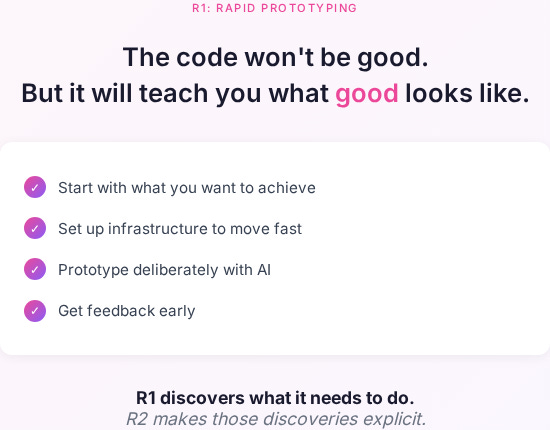
R1 discovers what it needs to do. R2 makes those discoveries explicit.
Try It Yourself
Next time you’re prototyping with AI:
Define the goal first:
What do you want to achieve?
What feedback do you need?
What gap are you solving?
Set up infrastructure (2 minutes):
Dev container for dependencies
CI/CD for build/test/lint
Quick verification commands (make test, make build)
Strongly typed language if possible
Then prototype:
Plan first - don’t just start coding
Get architectural examples from similar projects
Compare approaches with pros/cons
Make an informed choice
Get end-to-end working fast
Release early (alpha/internal/whatever)
Get real feedback
And when working with Claude:
Explicitly say “no fallbacks”
Explicitly say “tests are the spec”
Explicitly say “show me failures”
Give it TODO lists to check off (it loves this)
Keep the feedback loop tight
The code won’t be good. But it will teach you what good looks like.
Start with what you want to achieve. Set up infrastructure to move fast. Prototype deliberately. Get feedback early.
That’s R1.
Building something with AI? Try the rapid prototyping process. See what you discover.
Want to see this in practice? Check out Syster on GitHub - you can see the messy commits from R1, the cleanup in R2, the refactors in R3.
Think I’m wrong about Claude’s behaviors? I probably am in some cases. These are my observations from building Syster. Your mileage may vary. Let me know what patterns you’ve seen.
I really like this structured approach, which shouldn't really be that different if you didn't use AI to assist you. If you can't understand or articulate what you want, you should not trust an LLM to do it for for, because you're right, that would lead to chaos. I wish we didn't have to forcefully explain that we want basics like error handling added - I think that should just be the expected default - but I have seen some success using Claude for larger scale problem solving and analysis in a recent project.
Great write up!
Excellent analisis, I really connect with your observation that 'no clear goal, no feedback loop, no idea what done looks like' often leads to chaos, though sometimes I wonder if a little bit of undirected exploration is almost inevitable before a clear prototype emerges, even with AI.